Now We're Getting Somewhere - A First Prototype for a Co-Designed, Blind-accessible Auditory Navigation Toolkit for 3D Open-World Video Game Environments
By Luke Child and Dr Natanya Ford from the University of the West of England
- Introduction
- Initial Prototype Design
- Co-Design Methodology
- Generated Themes
- Summary
- Acknowledgements
- References
- Poster
Introduction
Navigation is a common feature in 3D open-world games due to the spatial affordances of video game environments. Navigation tasks in games can be categorised in many ways (Debus 2016) and often require players to engage with points of interest within a game environment, such as following a character, manoeuvring around a hazard, or moving towards a distant landmark. However, many navigation tasks in games rely on crossmodal interaction between visual and physical modalities; the player sees a landmark (visual) and uses an input device to transport their character towards the target (physical). For players relying on auditory information alongside their input instead of visual, this task becomes difficult to achieve. Gonçalves et al. (Gonçalves et al. 2023) identified the strategies in which Blind players are adapting to playing visual centric games, however suggest that "game design is currently failing to meet blind players’ needs". A core issue is a noted lack of understanding from developers in the games industry. The RNIB (RNIB 2022) found "only 15% of developers reported having sufficient understanding of the needs of gamers with sight loss". Furthermore, they evidenced that the key barriers cited by developers were "a lack of game engine support for accessibility features, accessibility solutions might adversely affect gameplay or creativity, and complexity." Despite this, sound-motivated navigation in game spaces has been successfully demonstrated with Blind and Low Vision (BLV) gamers in existing research. Examples such as looking around in 3D environments (Nair et al. 2021), mapping 3D environments (Nair et al. 2024; Tanaka 2023), spatial preferences (Nair et al. 2022) and more generally through literature reviews and player studies (Piçarra et al. 2023; Agrimi et al. 2024) show that Blind-accessible navigation is indeed possible. Additionally, sonification strategies for guidance and navigation in immersive environments have been documented (Sánchez et al. 2010; Parseihian et al. 2016; Gao et al. 2022; Poudratchi et al. 2024) and show success in alleviating the pressures of visual barriers for BLV gamers. This research successfully engages with Blind and Low Vision gamers, however there is less engagement with game developers directly, meaning there is limited exploration of the dialogue between game designers, gamers and developers.
In our work, we present the first 2 design prototyping phases of a co-designed toolkit for auditory navigation in open world games, designed across two phases involving 3 BLV gamers and 2 game developers from different disciplines. We draw together previous solutions to auditory navigation and present a technical breakdown of the first prototype for 3 auditory navigation tools alongside insights across 2 co-design phases. We acknowledge the early stage nature of this work but hope to emphasise the requirement for BLV player and developer-centric conversations around auditory navigation in video games to support the development of accessible auditory navigation mechanics in future games.
Initial Prototype Design
Dialogic Discussions with Disabled gamers
The first iteration of our tools was developed from our previous study in which we conducted a series of semi-structured, dialogic discussions conducted with 9 Disabled gamers. These gamers have a diverse range of abilities and gameplay barriers and regularly use accessibility features to adapt their gameplay experiences. The focus of these discussions was to identify the types of accessibility barriers found in gameplay experiences and to understand how the pressures of these barriers could be alleviated through sonic interaction design. We followed a reflexive thematic analysis protocol and from generated 4 themes:
-
Navigation is an crucial accessibility barrier that spatial audio may provide access to however it is often unsuccessful due to spatial audio being isolated from other game systems or being treated as aesthetic
-
Deep customisation of game audio features is desirable for gamers to develop setups that uniquely work for them but abstractions/presets are required to minimise cognitive overloading or to provide entry-level engagement with accessibility features
-
Fostering strong sonic identities allows gamers to learn and recollect game mechanics and systems quickly through auditory learning.
-
Game information and systems should exist multimodally to allow for gamers to blend or exclude modalities based on their requirements
With relation to sound design, most discussions focussed on navigation or localisation within a virtual environment. Particularly, this disadvantaged players who sound-motivated, with Blind and Low Vision participants noting either the lack of auditory navigation functionality, or the removal of player agency in lieu of a solution being available. Additionally, participants noted the requirement for staggered customisation and tutorialisation when learning new tools, particularly when visual information is not accessible in the learning experience. From these discussions, the authors prototyped the first iterations of the gameplay tools presented here before engaging in co-design phases to test and develop each tools’ functionality.
Environment Design
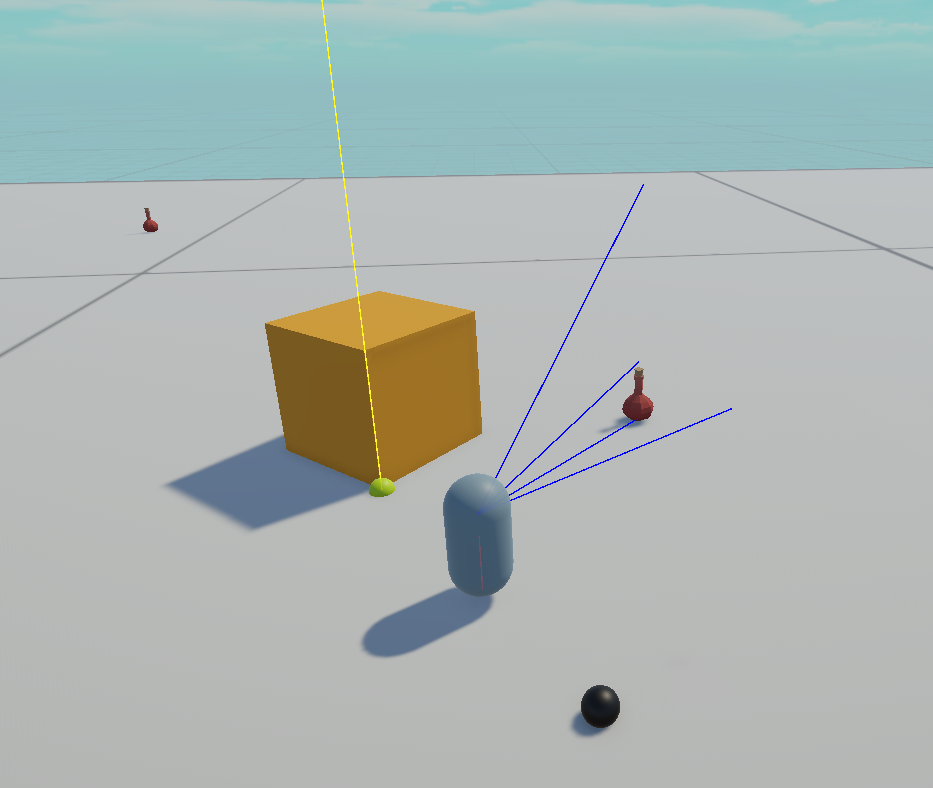
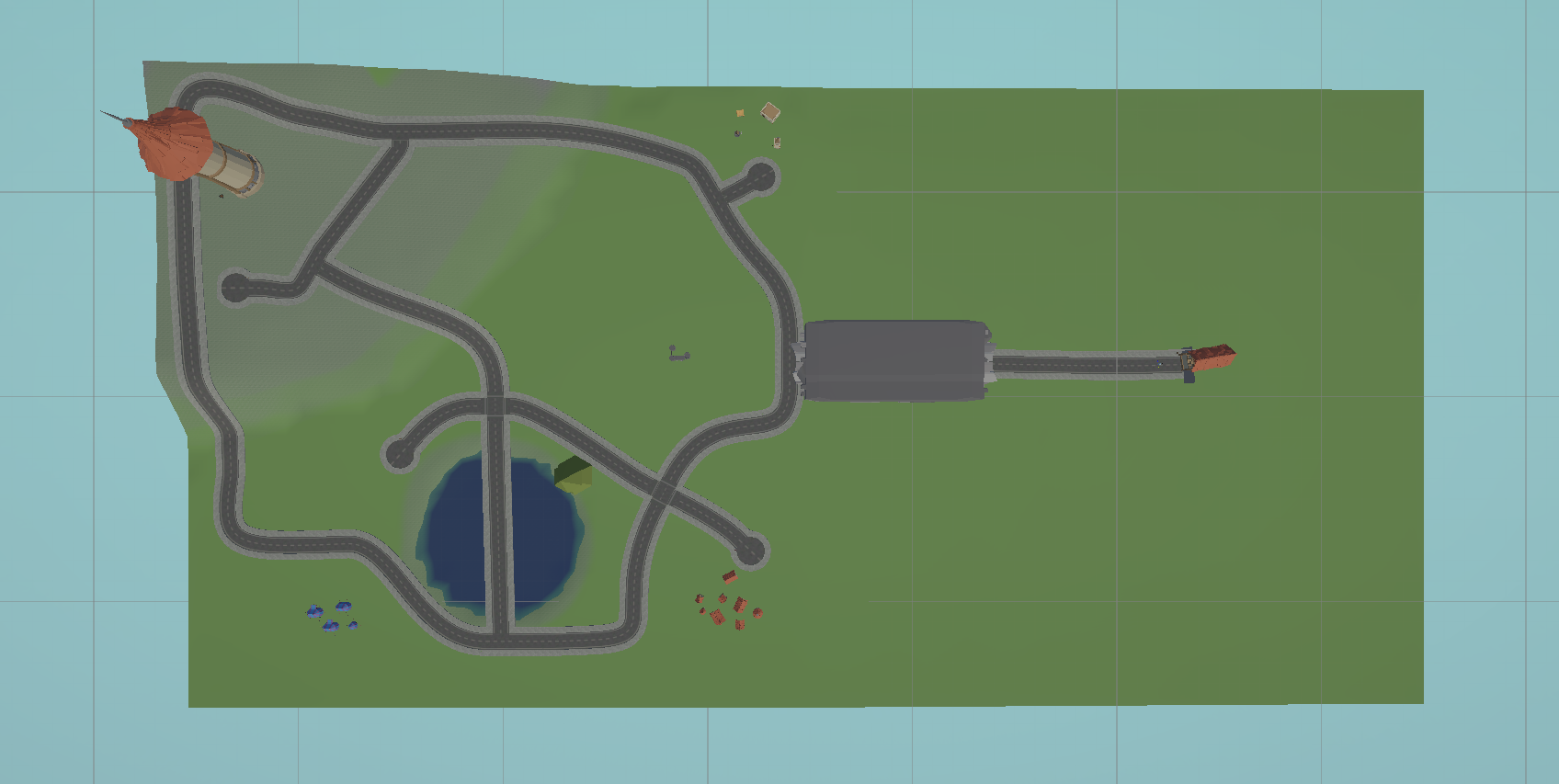
The Unity Game Engine was used for development of the test environment. A 3D base terrain map was created and populated with visual landmarks. The Unity First Person Controller asset was used for first-person control using a game controller. Following design phase one, an simplified flat-plane testing environment was created. Cubase 15 and FMOD Studio were used for audio processing and implementation and Atmoky TrueSpatial was used for binaural rendering and spatialisation. The environment is designed to be experienced with headphones. ReadSpeaker Text-to-Speech (TTS) for Unity was used to provide manual narration for in-game events and menus. The game system uses a gamepad for input.
Tool 1 - Distance-based Object Scanning and Targeting
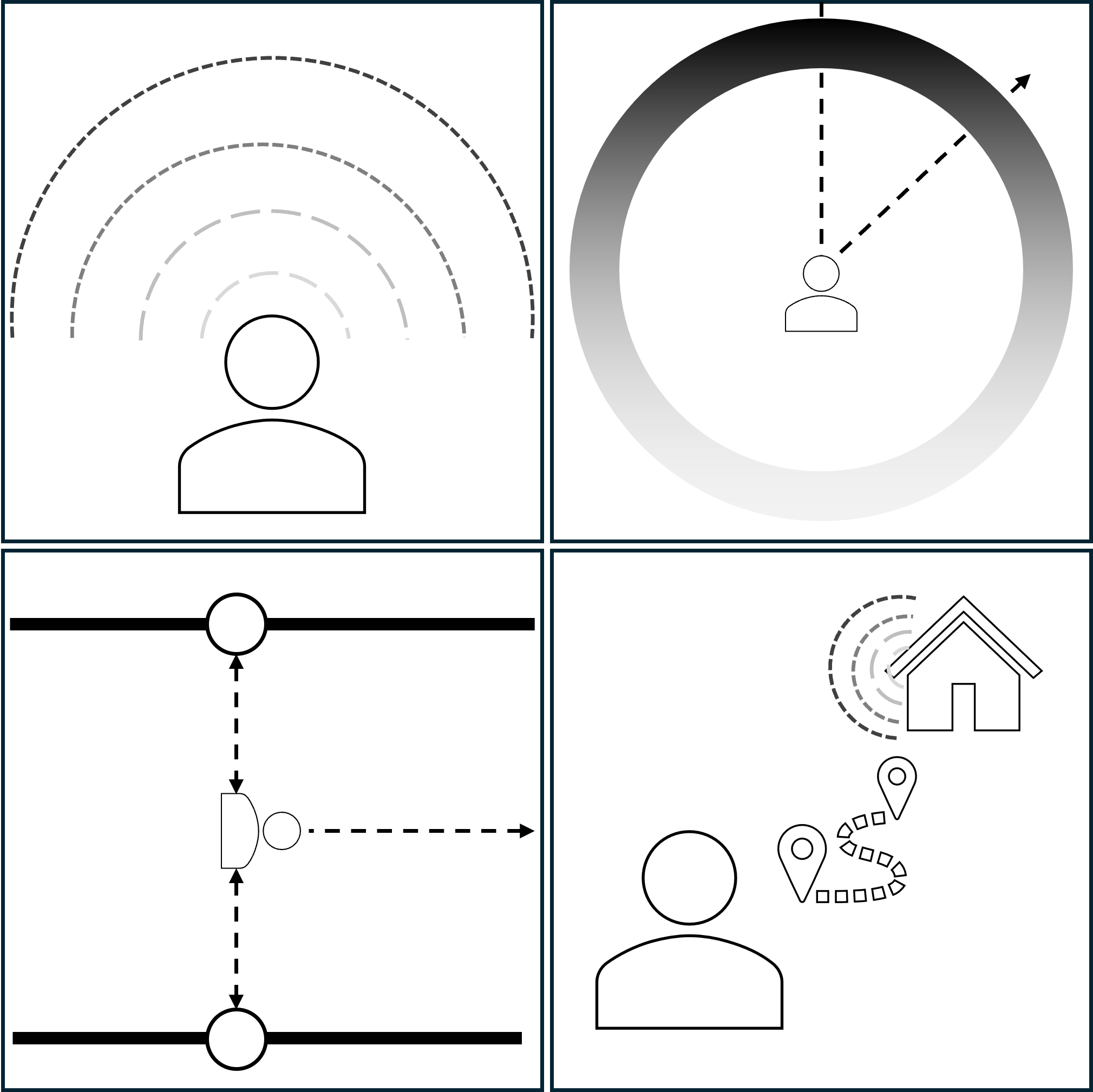
The first tool provides the player with 2 environment scanners. These scanners allow the player to scan for distant landmarks or close points of interest:
-
Landmark Scanning - The landmark scanner searches in a far range for Game Objects present in the scene that have been manually-applied with a ’Landmark’ tag. This features objects such as distant mountains, a lake or a village. These objects are then stored in a dictionary alongside their distances in metres.
-
Point of Interest Scanning - The Point of Interest scanner searches in a close range for Game Objects present in the scene that have been manually-applied with a ’POI’ tag. This featured objects such as a sword, shield or a potion. These objects are then stored in a dictionary alongside their distances in metres.
Text-to-Speech (TTS) informs the player on the amount of objects that have been identified. For each object, a nondescript, binaurally-spatialised ping plays, spatially positioned according to the object’s direction and attenuated according to its distance from the player. Once scanned, the user is provided with the ability to choose a target to focus on using the left and right d-pad buttons. They can toggle between landmarks and POIs using the up d-pad button. When doing this, the object’s name and distance are relayed to the player.
Tool 2 - Sonifying directionality based on the player’s camera perspective
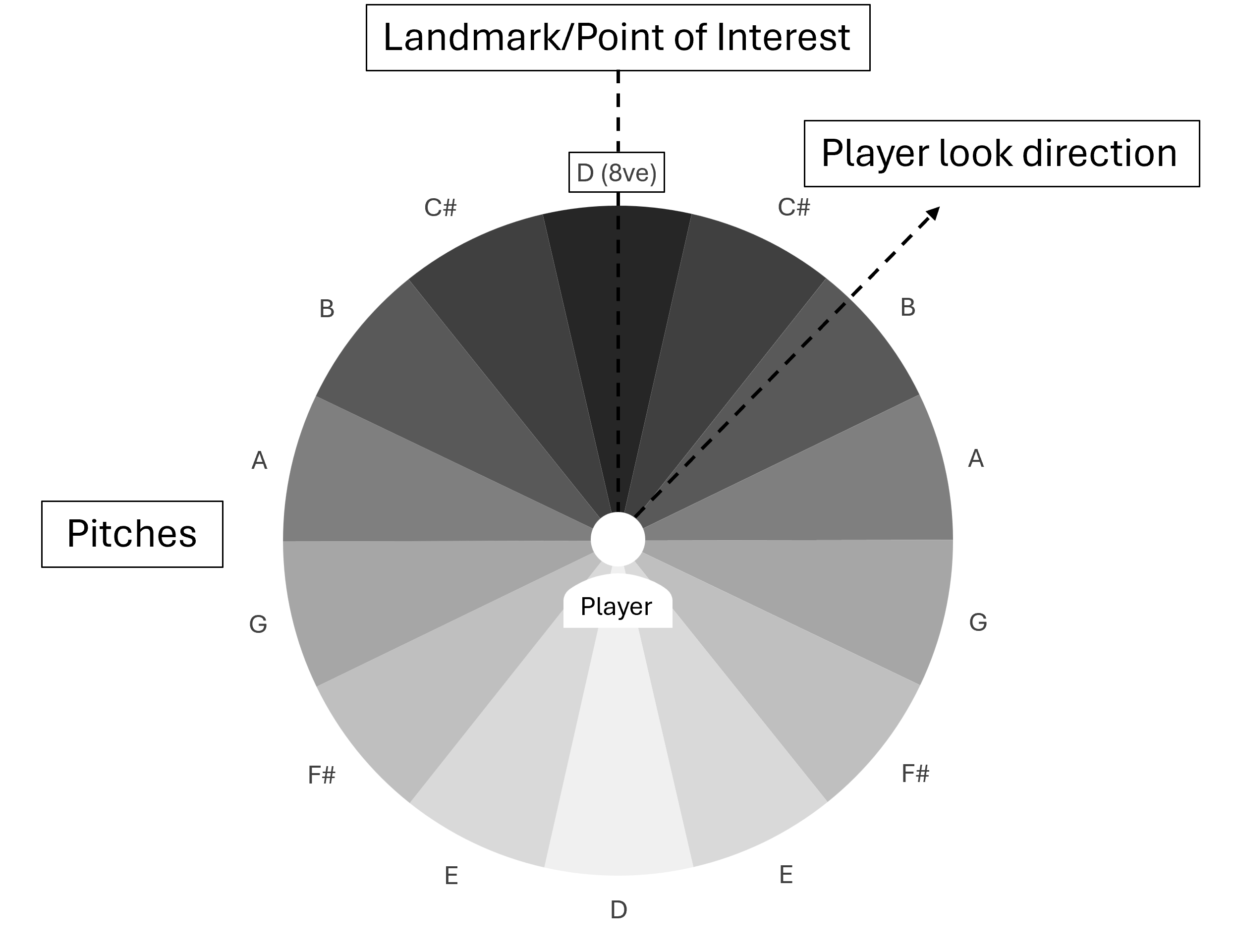
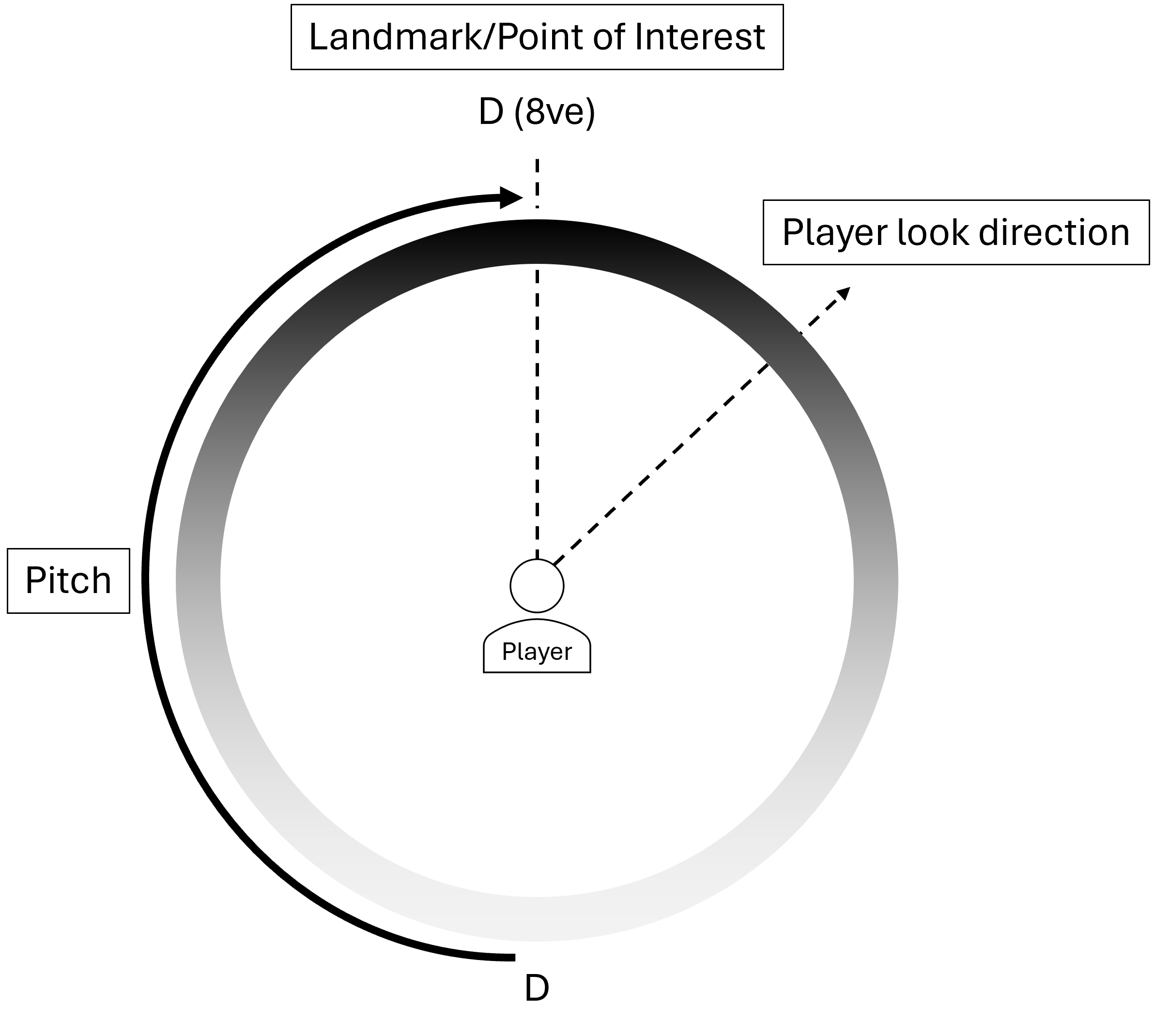
When a player has selected a target to focus on, they can activate a sonification tool that assists the player in turning towards the direction of their target. As the player rotates towards or away from the target by looking left to right or up and down, sound plays based on the following parameters. In designing our sonification strategy, we build on research from (Ahmetovic et al. 2019, 2023; Sekhavat et al. 2022; Gao et al. 2022; Poudratchi et al. 2024) and outline our current sonification choices below:
Pitch Distribution: Discrete, Continuous or Intermittent
Players can choose between listening to a Discrete, Continuous or Intermittent sound that plays based on the player’s camera rotation towards a target. Each version relies on a different musical quality to discern rotation:
| Pitch Type | Musical Parameter |
|---|---|
| Discrete | Scaled Pitch |
| Continuous | Non-musical Pitch |
| Intermittent | Tempo |
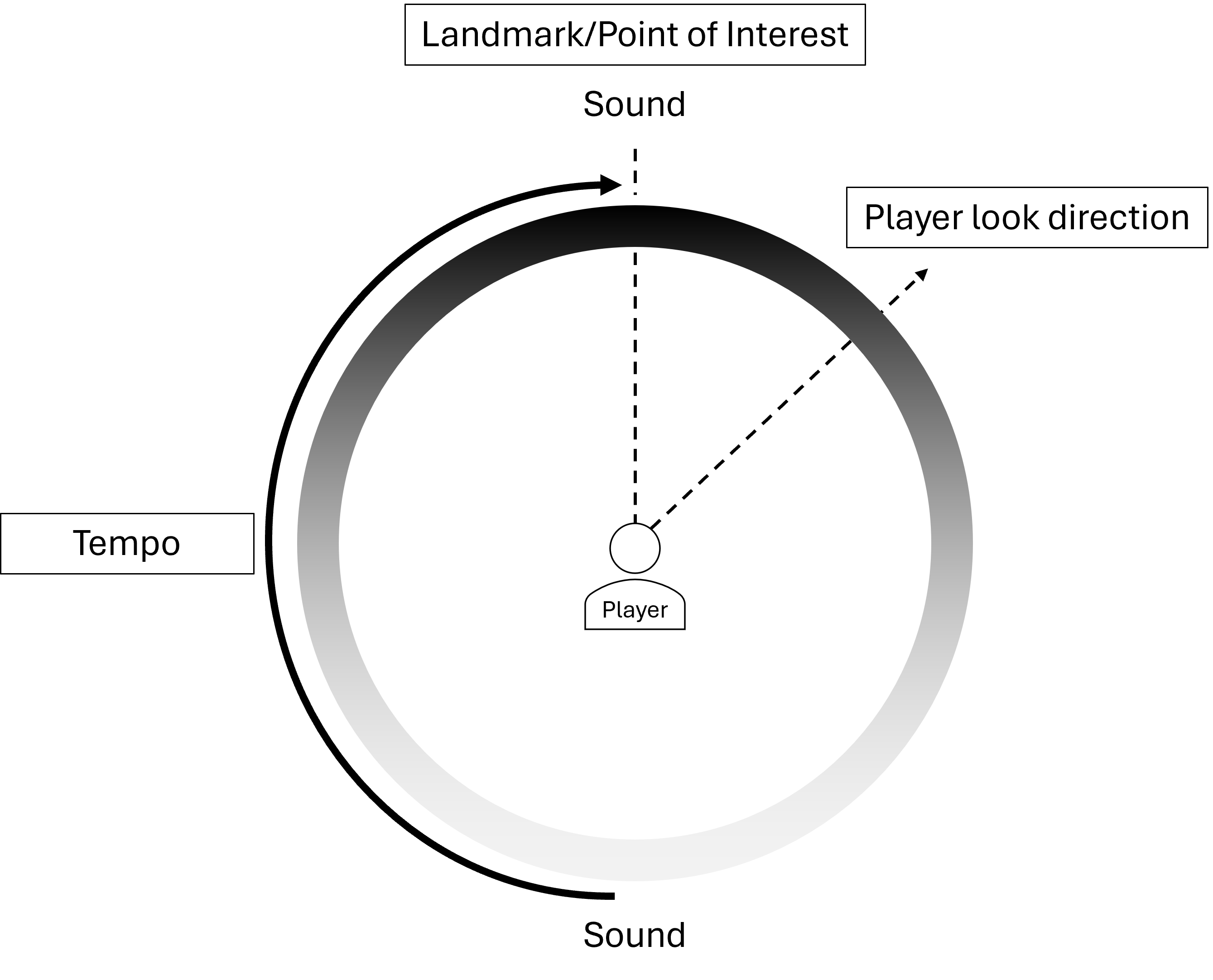
Pitch Salience: Pitched or Percussive
Players can choose between using sounds with discernable pitch content or percussive sounds. This presented a unique challenge in pitch-shifting sounds that have no discernable pitch. In this first form, FMOD’s pitch shift effect was used, however additional avenues will be explored in future iterations.
| Salience Type | Sound |
|---|---|
| Pitched Continuous | Sine sweep |
| Pitched Discrete | Piano Tones |
| Pitched Intermittent | Tonal Beeps |
| Percussive Continuous | Noise |
| Percussive Discrete | Short Noise Bursts |
| Percussive Intermittent | Ticking |
Active Axis: Left-Right, Up-Down, or Both
Finally, when using these tools, players had the ability to activate/deactivate different axes at any given time. This affected rotations around the Y axis (looking left to right) and Z axis (looking up and down) and meant players could use either, both or neither at any time. The customisation also allows for different combinations, such as intermittent pitched or intermittent percussive.
Tool 3 - Buffered Pathing
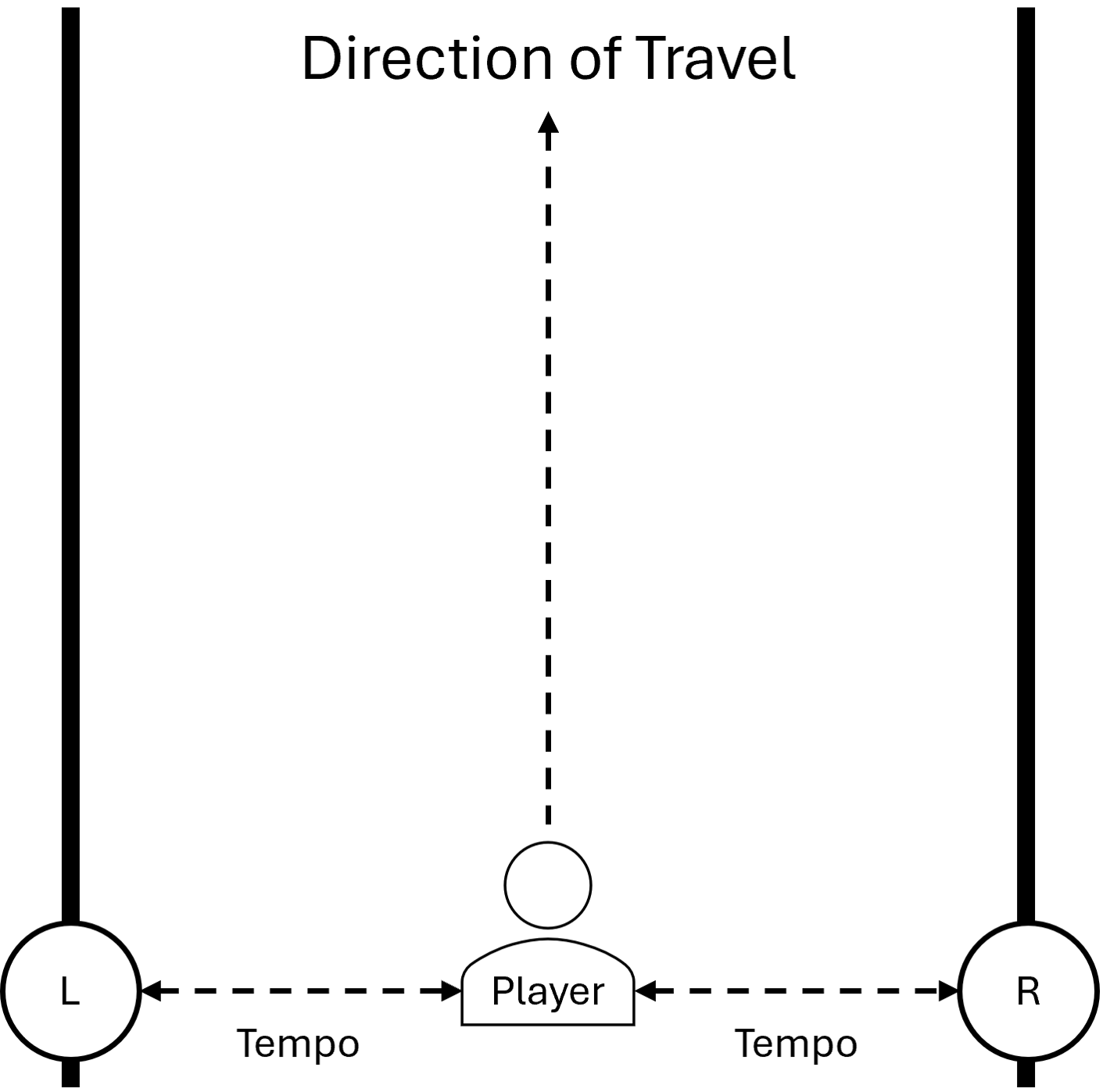
Tool 3 utilises Nav Meshes in Unity to provide closest edge distance information to the player when they are travelling on a pre-determined path. When the player is on a path, a point is placed at the edge of the path that is currently nearest to them. A beeping tone plays intermittently at this point in space and is spatialised binaurally to the player. As the player nears this point in space, the tempo of the beeping increases, and decreases when they move away. Should they get closer to the opposing edge, the beeping moves to the new point in space, alerting them to the new nearest edge. Players cannot cross the boundary and are blocked by collider buffers to keep them on the path until the tool is toggled again.
Co-Design Methodology
Participants
| Phase 1 | ||
|---|---|---|
| P | Experience | Vision |
| 1 | Accessibility Consultant; Game Developer | Blind |
| 2 | Game Accessibility Consultant | Blind |
| 3 | UX Designer; Game Developer | Sighted |
| Phase 2 | ||
| P | Experience | Vision |
| 4 | Game Accessibility Consultant; Accessibility Advocate | Blind |
| 5 | Technical Audio Developer; Musician; Modder | Sighted |
Participants were sent a build of the toolkit project and invited to an online call. During the call, participants playtested the build while using over-ear closed headphones and a gamepad and engaged in dialogic discussions with the lead researcher. Each participant was tasked with learning the basic use of each provided tool and also to use each tool in the custom-built 3D environment. While there is no explicit success criteria at this stage, players were encouraged to act freely within the space and to find points of interest and landmarks using the tools in the way that worked best for them. Basic tutorialisation was provided for players, both in-game and via discussions. Each playtest lasted between 1 and 2 hours and was visually and sonically recorded. Each call was transcribed and analysed using content analysis alongside engagement with the visual gameplay footage. Each transcript was coded by lead researcher before organisation into the overarching themes presented for discussion here.
Generated Themes
Theme 1 - Player Agency
P1 noted that "[where] navigational assistance still struggles [is] very heavily tied to the pathfinder... when it comes to totally Blind accessibility is we’re very good at getting you to the next objective, but exploration in that sense of freedom where you like, do you really feel you can go anywhere and then still find your way back to the main path?". In particular, they note the Clairvoyance spell in The Elder Scrolls V: Skyrim. P1 states there are "caveats with using a spell like Clairvoyance when the point is to get from A to B, but do you feel like you still have that sense of kind of curiosity, or is it kind of more of like like a safety net?" Some gameplay pathfinding scenarios may lock a player into an ’on-rails’ experience, where the player is allowed to move their character, but is locked to a given path, as if being a "train on-rails". Alternatively, P4 emphasises agency-driven on-rails pathfinding with Diablo IV as an example. They state "You have a [pathfinding] line but you can change where it’s going... Say I’m in the middle of doing a quest and then you say "right, let’s go and do this thing, I need a hand from you because you’re doing way more damage than me". We teleport the map marker cursors to where you are, and because the pathfinding line has changed, I just follow the line again". While a completely on-rails experience may limit agency in some cases, dynamically altering targets and pathfinding fluidly based on the player’s choice of target during gameplay may provide a suitable and accurate compromise. P1 described using the pathing tool in this way using the analogy of rails at a bowling alley. They state "I use the rails, so that my ball doesn’t go into the gutters. When you’ve done a scan, if I then walk towards [a landmark] I have the little rails. The second you go just the slightest off the path, it pushes you back on".
An example from testing occurred when P1 had tasked themselves to find a tunnel within the environment and go through it. While using the tools to navigate to the tunnel, P1 had veered off of the main path towards the tunnel and across a grassy area. They had passed an audio source and scanned the area to find a potion was nearby. They ignored the potion and instead navigated to the tunnel to complete their current objective. Upon completing the task, P1 responded "Cool, I’m going to go back and see if I can find those potions now". They chose the potion as a target reoriented themselves to go find the potion. Due to the ability to leave the intended path to the tunnel and find the potion in the first place, they could then switch to a new target and repurpose the tool to visit the location of the potion. P1 notes that "If I do stray too far off, I know now I can get back to where I was trying to get to" (the potion). P5 noted issues in object management here though, saying "if you’re keeping track of every single item in the environment space, that’s gonna be a lot of items to remember, but also a lot of cognitive energy that the player is burning sorting through and selecting a new target from a list of hundreds. That could also get intensive on the game depending on how many things you’re tracking and to what level of detail.".
This theme highlights that auditory navigation should support guided freedom, however not strict pathing or open-ended exploration, but instead the ability to select, leave and return to a point in the environment.
Theme 2 - Action Precision
P2 successfully used the directionality tool to locate a target of their choice, however the high precision needed to directly look at a point of interest was a barrier. When using the continuous pitched sound, P2 was unsure what constituted looking directly at the target. They noted "When I was scanning nearby and [the tool] found the rucksack, it said I had "one metre" to go, but then for some reason I couldn’t pick it up." The finer level of precision using the continuous tool was not discernable to P2 and as such making micro movements with the camera felt unrewarding as they could not directly look at a target with confidence. As a workaround, P2 mentions a "larger than normal buffer zone of forgiveness" in confirming to the player that a location has been targeted. P3, P4 and P5 found this discernment between pitches more noticeable, with P4 and P5 noting their music backgrounds aiding in this. P4 stated ’without that prior [musical] understanding, I might have no understanding as to where my target is on that scale when it moves chromatically". P5 agrees, suggesting the use of more explicit musical scales, saying "yeah if this was more akin to a major scale perhaps, it might make more sense to non-musical players who at least know their solfège scales!". P1 says "You’d hope that people are at least able to connect even if you have no music theory understanding", which presents an area for further research into music theory concept perception in a video games context.
This theme highlights that auditory navigation systems in this style should not rely on high-precision actions, and instead should provide mitigations to make high-precision actions achievable. Additionally, when using precise interaction for game objects, confirmation that an action has been completed successfully or unsuccessfully should be a priority so that players are not confused if their understanding of the state of an action is misaligned with the reality of their inputs.
Theme 3 - Gameplay Fluidity and Cognitive Load
While using the scanner functions, P4 noted that "scanners always break flow of play... in terms of fluidity, a sighted player can just see it, go towards it, that’s it, you’re good. With scanners, you’re stopping, you’re waiting, you’re forced to slow down and pause when in fact all you want to do is run". In all gameplay experiences, all participants would move and scan independently of each other; a player would scan, move through an amount of space, and then scan again, repeating this process. P2 and P3 found that the level of complexity in instructions meant that they constantly had to process different information sources and could not engage with the tools as fluidly as each one required higher amounts of cognitive function to use, especially as beginners to using the tools. In their gameplay, P1 uses the tools and is focusing on multiple sources of auditory information. They say "if you introduce too many noises, you might run the risk of sensory overload. Like now!". P4 suggests filtering the information that is captured by navigation tools to allow reduced cognitive load and would streamline the usage of the tools. They mention "You could have a setting where... let’s say you get easily overwhelmed or you just want to focus on one type of thing. I’m just going to focus on the combat things, so I filter my list of scannable things down to just combat things".
This theme highlights that auditory navigation systems introduce cognitive load that disrupts the gameplay flow of BLV gamers. As such, designers should carefully manage both the timing and information density provided to the player and additionally consider context-aware, dynamic systems that do not require player interaction.
Theme 4 - Categorisation and Identification of Sound Sources
Game environments are often comprised of many different features to provide players with rich and engaging context to their gameplay. However, using auditory information alone, complexity arises very quickly when asking players to remember and recall different audio for each unique experience. When using the scanners in this session, a nondescript beep was used to inform players that a landmark or POI had been found. After using the scanners multiple times, P1 notes that in their own developments, a sound designer may use "different categories [such as for] items, NPCs, and then hidden objects... Each three of those are their own sound category. They all have a different bespoke noise. It’s good to have them be their own category so that they’re all individually recognizable so that way not everything is making the same noise". In their own projects, P3 stated "we wanted to have food items that you can eat, resource items that you can pick up and use as tools, and also other types of items, which would be something you built or something else that doesn’t apply to the other two categories. It might be helpful to have the most important categories now, so you don’t have 100 different sounds. If it’s a lot of sounds to keep track of, it’s going to be hard". Alongside categorising, some players could not identify the use for certain sounds.
In their playtest, P1 had navigated to and passed through a tunnel in the game environment, but the reverberation profile of the tunnel was not sufficient to aid them in understanding where they are. On reaching the tunnel, P1 proceeded to walk past the tunnel and ask "I’m still trying to look for the tunnel because I don’t think I have gone through it yet" before being informed by the researcher that they had. P1 notes the requirement for a "completion tone that lets you know that you’ve completed something". P2 had a similar experience when engaging and disengaging the directionality tool. As there is a sole reliance on auditory information, the use of easily identifiable sounds is pertinent to understanding the state of tools. On activating the tool, P2 notes "I think I heard something when I enabled the tool, then when I disabled the tool, I heard some some audio playing, but I didn’t think that was for the item...". The sound for activating and deactivating the tool signalled a change in state to the player, but the ambient idle sound it makes when active did not convey the correct state to the player. Additionally, they note that given the lack of visual information, auditory signals for states need to be strong and obvious so players can confidently react to an audio cue successfully.
P4 mentions the use of sweeteners in The Last of Us Part II, noting "[when] moving towards an object, you’ll hear both the interaction queue and the secondary layer that they’ve implemented for it, which is basically saying, "this is a horse, this is a drawer, this is a bottle... it doesn’t have to be exact, as long as you can learn them!". P5 mentions similarly about the lessened need for exact audio design with "from a meta perspective, it would make sense if locations and objects had their own sonic identity. Like, if I’m walking along and I hear there "ooh sparkly shiny item" sound, and that sounds different to the "big scary landmark" sound, then you’re reducing the cognitive load again of needing to remember a bajillon different sounds for each item".
This theme highlights that auditory navigation systems require structured categorisation of sound sources to remain usable when games feature many points of interest and landmarks. Designers may categorise sounds at different levels of granularity so players can engage with a small number of distinct, learnable sound categories passively. This reserves cognitive capacity for most gameplay situations but allows specific points of interest and landmarks to be recognisable and sonically unique without overloading cognitive capacity.
Theme 5 - Player Sound Preferences
Overall, players preferred the use of discrete pitched sounds to measure rotation, but intermittent percussive sounds to represent distance. Continuous sounds were successful in conveying information, but were deemed inferior and less pleasant compared to discrete/intermittent sounds. P1 notes "I like the clicking as long as it’s faster versus slower when you’re going somewhere". They extend this discussion with suggesting that for percussive sounds, the use of haptics should be a given to provide an additional mode for receiving information non-visually. When using continuous pitched sounds, P1 requested that a wider frequency spectrum be engaged with as an alternative to pitch alone. This might translate to the use of specific frequency boosting/cutting alongside pitch manipulation to provide 2 auditory phenomena as sources of information for the player.
P2 discusses the use of discrete pitches and says "I really like those sounds. The discrete one was very nice. Like it changed the kind of notes when I was scanning around left to right. That sounded really, really, really pleasing to hear, actually". However, they disliked the use of functionally designed sounds outside of the diegesis of the game from an immersion perspective, stating "I think it lost the immersion there with the beeps, though" P3 noted that continuous pitched sounds sounded "stressful" and was "annoying and uncomfortable to [them]". They expressed the desire for customisation around sonifying directionality due to the sounds persistent nature. When using the tool with continuous sound, the player is continuously listening to the same audio depending on the direction of their camera. P3 notes "if you can choose between the type of sound, then you might find something that works better for you. Being able to craft this sound into something the player finds pleasant to listen to themselves would provide a more comfortable and enjoyable experience of audio-only navigation using a continuous sound. P5 liked the sound, and suggested "actually, this kind of customisation might even be fun mechanically. Like, imagine having ’sound packs’ where it’s a bit of fun where you pick the sounds you prefer for a tool like this, but also as a hidden accessibility feature, you’re providing the chance to say ’that sound doesn’t work for me, but this one does!". While particular sound types seem emergent as the most successful for use in navigation, the ability to substitute or manipulate sound cues in-game may provide accessibility for players who dislike the commonly chose configuration here.
This theme highlights that auditory navigation systems must support personalisation, as the effectiveness and enjoyment of navigation sonification will vary between players. Flexibility in customising such systems may provide accessible experiences through players choosing a bespoke settings setup, but may also provide avenues for new game mechanics revolving around customisation.
Theme 6 - Tutorialisation and Learnability
Onboarding for the tools was provided via a basic in-game tutorial and through instructions provided by the lead researcher. A TTS system was used to rapidly prototype a tutorial in which each player was provided with a function of the tool and the corresponding button to complete the function. P1 and P2’s experience with the tutorial were both successful. P2 mentioned of the tutorial that "it’s good to have some kind of interactive tutorial to teach you stuff for games and I don’t mind it being the way it is". P1 noted being "nervous when [they] started a tutorial on [their] own." noting concern about making progress. They specify "you’re always worried, like, okay, will I be able to actually make sense of this and utilize it the way that the designer is hoping that people will be able to use it." However, after engaging with the tools and the tutorial, they state "being able to get the water jug, my ruck sack, actually actively do that on my own without you. was a really cool feeling. And then, of course, knowing that I made it to the tunnel, I’m like, great! This is already working. This is already doing something that I wish was in more games."
P1, P2 and P3 all noted a desire for a tutorial that treats the player as part of the game and does not view tutorialisation as purely functional. P3 found engagement with the tool very difficult due to the lack of sufficient tutorialisation and not being a player who is used to relying on auditory information as the primary modality. Given that the sole modality is through listening to descriptions of the tutorial, the use of a TTS voice to deliver the tutorial was overwhelming and confusing due to the lack of human delivery and the lack of control over how the audio is engaged with. They mentioned "if the tutorial is really long, like if I’m reading with my eyes, I can just read the sentence that I want and pause. I can even read it again. But I could at least pause. If I’m listening to it, I could at least say, "wait, stop". And let me process what I just said. I’d like to rewind if I need to without having to go through the whole tutorial again". This was reinforced through their continued engagement with learning to use the tool, which was overshadowed by a lack of auditory feedback that a task was completed as intended. In the tutorial, when a task is completed, the player is alerted with a brief major triad tone.
However, these tones often came as a surprise for P3 as they did not understand how their use of the tool contributed to the completion of the task. The tutorial’s understanding of completion was not parallel to the player’s understanding. By the end of the design session, P3 understood the functionality the toolkit provided, but felt like they did not understand how to action it in the game. They suggested the baseline of providing open customisation to the TTS voice so that players can find a preset that works best for them. They additionally opted for the removal of the TTS tutorial entirely in favour of a slower, human-delivered tutorial that takes each section of the directionality tool in isolation and provides multiple opportunities for reward-driven use of a particular feature of the tool. P5 agreed, stating "it feels unintentional like this. Especially given it is the first chance to use the tools, you’d want to make that a memorable experience, not just a learning one".
This theme highlights that auditory navigation systems require tutorialisation to support learnability and should provide interactive, controllable, and segmented tutorial experiences. However, as tutorials are commonly crossmodal in their delivery, further research into effective auditory tutorialisation should be conducted to provide BLV gamers with adequate tutorialisation of gameplay mechanics.
Summary
We present the early findings from the first prototypes of a co-designed set of tools for accessible auditory navigation in 3D open-world game environments. We contribute: 1) a technical breakdown of our toolkit in its current iteration, 2) qualitative insights from seven themes rooted in exploratory discussions with sighted developers and Blind and Low Vision gamers, and 3) a reference point for the design of novel, accessible navigation systems in 3D game environments. We hope our brief exploration of an accessible navigation toolkit in context provides a starting point in bridging the accessibility knowledge gap experienced by game developers. We invite developers and researchers to actively engage in deeper conversations about navigation accessibility in video games to inspire new opportunities for accessible navigation for Blind and Low Vision gamers in future video game releases. (Informatech 2022)
Limitations
We acknowledge that only five participants were involved in this study. While this afforded in-depth dialogic discussions with each participant, the findings may not generalise across the broader BLV player community and emphasise the need for player-customisable systems. As such, it is crucial to continue to engage with gamers and developers throughout the long-term development of this toolkit. Additionally, our study uses an exploratory, qualitative methodology to understand the early insights. However, this currently prioritises depth over generalisability. A stronger mixed-method framework is needed in future work and would allow for richer qualitative insights alongside quantitative measures of player interaction and performance. Finally, our prototype system exists in a bespoke environment. While this allowed for focused investigation of specific interaction techniques, our discussions with developers are focused on the toolkit and do not discuss the complexity of implementing such tools into a fully realised commercial game environment. Future research should measure how accessible auditory navigation systems impact players and performance of a complete game environment.
Acknowledgements
This study contributes towards the completion a university-funded PhD. Heartfelt thanks are given to the participants of this study for sharing their lived experiences and technical expertise.
References
- Agrimi, Emanuele, Chiara Battaglini, Davide Bottari, Giorgio Gnecco, and Barbara Leporini. 2024. "Game Accessibility for Visually Impaired People: A Review." Application of Soft Computing. https://doi.org/10.1007/s00500-024-09827-4
- Ahmetovic, Dragan, Federico Avanzini, Adriano Baratè, et al. 2019. "Sonification of Rotation Instructions to Support Navigation of People with Visual Impairment." IEEE Pervasive Computing and Communications (PerCom). https://doi.org/10.1109/PERCOM.2019.8767407
- Ahmetovic, Dragan, Federico Avanzini, Adriano Baratè, et al. 2023. "Sonification of Navigation Instructions for People with Visual Impairment." International Journal of Human-Computer Studies. https://doi.org/10.1016/j.ijhcs.2023.103057
- Debus, Michael S. 2016. "Video Game Navigation: A Classification System for Navigational Acts." Replay. The Polish Journal of Game Studies 3. https://doi.org/10.18778/2391-8551.03.02
- Gao, Zihan, Huiqiang Wang, Guangsheng Feng, and Hongwu Lv. 2022. "Exploring Sonification Mapping Strategies for Spatial Auditory Guidance in Immersive Virtual Environments." ACM Transactions on Applied Perception. https://doi.org/10.1145/3528171
- Gonçalves, David, Manuel Piçarra, Pedro Pais, João Guerreiro, and André Rodrigues. 2023. "My Zelda Cane: Strategies Used by Blind Players to Play Visual-Centric Digital Games." Proceedings of the 2023 CHI Conference on Human Factors in Computing Systems. https://doi.org/10.1145/3544548.3580702
- Informatech. 2022. State of the Game Industry 2022. Game Developer Conference. https://images.reg.techweb.com/Web/UBMTechweb/%7B0e130537-da8b-43da-971d-ccd0104cdb02%7D_GDC22_Report_SOTI.pdf
- Nair, Vishnu, Jay L. Karp, Samuel Silverman, et al. 2021. "NavStick: Making Video Games Blind-Accessible via the Ability to Look Around." The 34th Annual ACM Symposium on User Interface Software and Technology. https://doi.org/10.1145/3472749.3474768
- Nair, Vishnu, Shao-en Ma, Ricardo E. Gonzalez Penuela, et al. 2022. "Uncovering Visually Impaired Gamers Preferences for Spatial Awareness Tools Within Video Games." Proceedings of the 24th International ACM SIGACCESS Conference on Computers and Accessibility. https://doi.org/10.1145/3517428.3544802
- Nair, Vishnu, Hanxiu "Hazel" Zhu, Peize Song, Jizhong Wang, and Brian A. Smith. 2024. "Surveyor: Facilitating Discovery Within Video Games for Blind and Low Vision Players." Proceedings of the CHI Conference on Human Factors in Computing Systems. https://doi.org/10.1145/3613904.3642615
- Parseihian, Gaëtan, Charles Gondre, Mitsuko Aramaki, Sølvi Ystad, and Richard Kronland-Martinet. 2016. "Comparison and Evaluation of Sonification Strategies for Guidance Tasks." IEEE Transactions on Multimedia. https://doi.org/10.1109/TMM.2016.2531978
- Piçarra, Manuel, André Rodrigues, and João Guerreiro. 2023. "Evaluating Accessible Navigation for Blind People in Virtual Environments." Extended Abstracts of the 2023 CHI Conference on Human Factors in Computing Systems. https://doi.org/10.1145/3544549.3585813
- Poudratchi, Samira, Yoones A. Sekhavat, Mohammad Reza Azadehfar, and Samad Roohi. 2024. "BatSight: A Navigation Game to Map Environmental Information into Audio Cues." International Journal of Serious Games. https://doi.org/10.17083/ijsg.v11i1.718
- RNIB. 2022. Accessible Gaming Research Report. Goldsmiths; University of Edinburgh. https://media.rnib.org.uk/documents/RNIB_Accessible_Gaming_Report_2022.pdf
- Sánchez, Jaime, Mauricio Sáenz, Alvaro Pascual-Leone, and Lotfi Merabet. 2010. "Enhancing Navigation Skills Through Audio Gaming." CHI '10 Extended Abstracts on Human Factors in Computing Systems. https://doi.org/10.1145/1753846.1754091
- Sekhavat, Yoones A., Mohammad Reza Azadehfar, Hossein Zarei, and Samad Roohi. 2022. "Sonification and Interaction Design in Computer Games for Visually Impaired Individuals." Multimedia Tools and Applications. https://doi.org/10.1007/s11042-022-11984-3
- Tanaka, Miyuki. 2023. "Action RPG Game Space Created by Listening: Spatial Exploration and Cognition Without Vision." Companion Proceedings of the Annual Symposium on Computer-Human Interaction in Play. https://doi.org/10.1145/3573382.3616037
Poster
Now We're Getting Somewhere – A First Prototype for a Co-Designed, Blind-accessible Auditory Navigation Toolkit for 3D Open-World Video Game Environments
Introduction
Navigation and wayfinding are commonplace tasks in open world video games. Players may notice a fearsome dragon circling a mountain in the distance, identify the safest path to reach it while diverting to a village for supplies on the way. Many navigation tasks can exist in video games [1] such as visual waypoints, player maps or by seeing objects present in an environment. These gameplay experiences are seldom accessible for Blind and Low Vision gamers.
In many games, accessible solutions for auditory navigation are either not considered or have varying degrees of success through improvisation by Blind gamers ([2, 3, 4] for example). There is a noted lack of understanding, motivation and resource provided to game developers [5] to achieve accessible experiences in video games.
Here, we present the early co-design of a toolkit that triangulates the experiences of Blind and Low Vision gamers, the technical understanding of game developers, and navigation and sonification research. In doing so, we hope to encourage conversation around making open world navigation experiences in video games Blind-accessible through humility, collaboration and fun.
Methodology
Firstly, dialogic discussions were held with 9 Disabled gamers to identify gameplay accessibility barriers through the lens of sonic interaction. From this, Luke then developed the baseline toolkit environment and first iteration of tools within a 3D, first-person game environment.
This development was led by themes generated from the discussions. Once the tool concepts and environment were developed, co-design sessions were organised individually with 5 participants: 3 Blind and Low Vision gamers who work in accessibility and 2 game developers.
Each participant was introduced to 3 tools and brief tutorial alongside guidance from Luke. Each player was tasked with discovering points of interest in the environment and navigating towards them whilst discussing their experiences using the tools in-situ.
Tools and Tasks
Tool 1: Environment Scanners
Task: Identify Point of Interest
Tool 2: Camera Rotation Sonification
Task: Align Player to Direction
Tool 3: Proximity-based Pathing
Task: Navigate to Target
Sonification Parameters
- Pitch – Lower/Higher
- Pitch Salience – Pitched/Percussive
- Pitch Distribution – Continuous/Discrete/Intermittent
- Distance – Nearer/Farther
- Volume – Quieter/Louder
- Tempo – Slower/Faster
Tool Descriptions
Tool 1
Close/Far Scanner. Targets are spatially relayed to the player through sound pings.
Tool 2
Sonification of player's rotation towards/away from chosen target (left/right and up/down).
Tool 3
When the player is close to a boundary/object, distance-dependent beeping occurs.
Co-Design Findings
Agency
Tools should facilitate a player's desire to be curious and navigate freely based on their motivation.
Precision
Tools should be adaptive in terms of the precision needed for different navigation tasks.
Fluidity
Tools should integrate with gameplay loops and mechanics to preserve fluidity in player actions.
Categorisation
Tools may use general sound categories to limit requiring players learning large, bespoke suites of sounds.
Customisation
Tools should be customisable to cater for a diverse range of preferences and requirements by players.
Tutorialisation
Tools should consider replayable, gradual tutorials to reduce audio cognitive load on players.
So Where To Next?
- Next phase of co-design after implementation of design feedback from sessions.
- Development of a success criteria through measured evaluation of tools in-situ with gameplay navigation tasks.
References
- Debus, M. S. "Video Game Navigation: A Classification System for Navigational Acts." Replay: The Polish Journal of Game Studies, 2016.
- RNIB. Accessible Gaming Research Report, 2022.
- Goncalves, D., Pincus, M., Pais, P., Guerreiro, T., and Rodrigues, A. "My Zelda Cane: Strategies Used by Blind Players to Play Visual-centric Digital Games." CHI Conference on Human Factors in Computing Systems, 2023.
- Andrade, R., Rogerson, M. J., Waycott, J., Baker, S., and Vetere, F. "Playing Blind: Revealing the World in Games with Visual Impairment." CHI Conference on Human Factors in Computing Systems, 2019.
- Information+, "State of the Game Industry 2022."
